¶ Connecting Newt Clients
Below, I will go over different ways you can setup Newt so you can setup Sites. That way you can expose some services publically.
¶ newt.service
You can setup a Newt service, that way if you reboot the service comes back up. Some of my VMs do not have docker installed so it makes sense to me at times.
- Download installer
curl -fsSL https://static.pangolin.net/get-newt.sh | bash
- Move binary to /usr/local/bin
sudo cp /home/$USER/.local/bin/newt /usr/local/bin/newt
sudo chmod 755 /usr/local/bin/newt
You can confirm Newt works by
/usr/local/bin/newt --help.
- Create a new systemd service file while replacing with your endpoint and keys.
sudo nano /etc/systemd/system/newt.service
/etc/systemd/system/newt.service
[Unit]
Description=Newt Client Service
After=network-online.target
Wants=network-online.target systemd-networkd-wait-online.service

[Service]
Type=simple
ExecStart=/usr/local/bin/newt --id YOUR_NEWT_ID --secret YOUR_NEWT_SECRET --endpoint YOUR_PANGOLIN_ENDPOINT
Restart=always
RestartSec=10

# Security hardening options
User=newt
Group=newt
NoNewPrivileges=yes
ProtectSystem=strict
ProtectHome=yes
PrivateTmp=yes
PrivateDevices=yes
ReadWritePaths=/var/lib/newt

[Install]
WantedBy=multi-user.target
- Create seperate Newt user
sudo useradd -r -s /bin/false newt
- Create directories
sudo mkdir -p /var/lib/newt
sudo chown newt:newt /var/lib/newt
- Enable and start the new Newt Service file
sudo systemctl daemon-reload
sudo systemctl enable newt
sudo systemctl start newt
- You can confirm everything is connected in the logs
sudo journalctl -u newt -f
¶ Updates
Below, I will go over on the different ways you can update Pangolin and Newt. Once you are logged into Pangolin, it should prompt you on the lower left hand corner that an update is available.

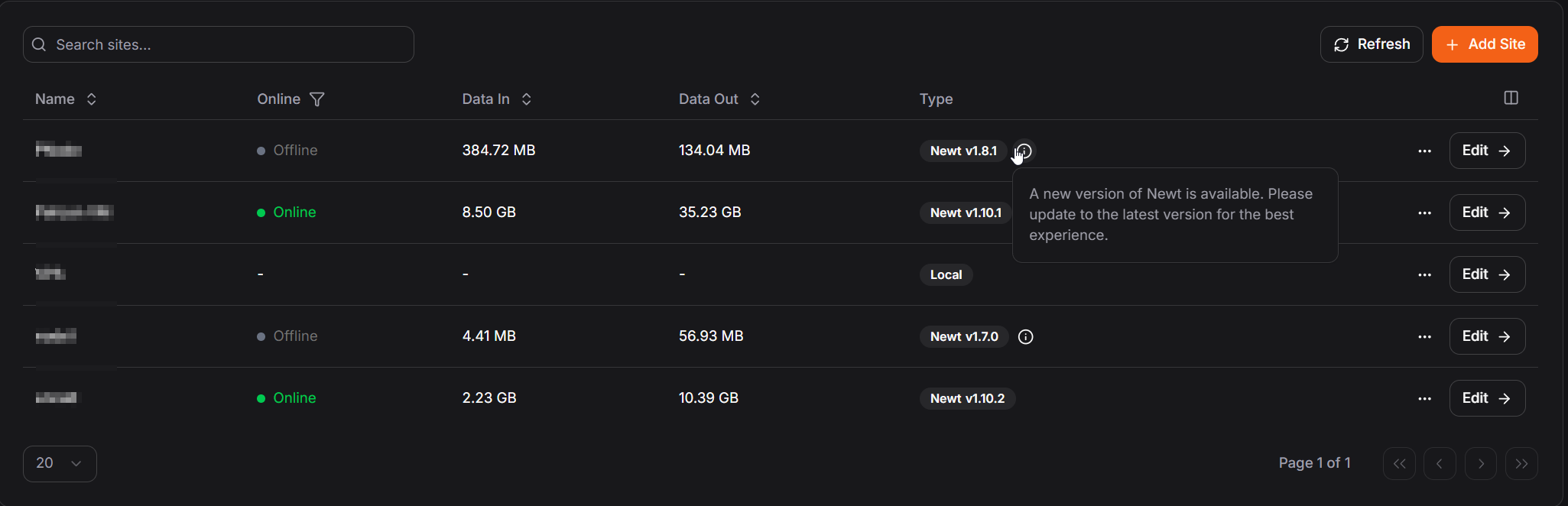
If you go to Network > Sites, it will also prompt you if a Newt client is needing an update as well.
¶ Update Pangolin
Usually Pangolin prompts if an update is available, it will have a link to their release page so you can see what version is most recent.

- Stop Pangolin
cd /opt/pangolin
sudo docker compose down
- Backup config directory to a safe spot
sudo cp -r config/ /tmp/pangolinbackup
Make sure to update versions incrementally for major version releases.
For example: Update from 1.14.0 → 1.15.0 → 1.16.0 instead of jumping directly from 1.14.0 → 1.16.0
Pangolin: GitHub Version
Gerbil: GitHub Version
Traefik: Docker Hub
Badger: GitHub Version
- Edit your /opt/pangolin/docker-compose.ymlfile with the updated image numbers.
/opt/pangolin/docker-compose.yml
services:
  pangolin:
      image: fosrl/pangolin:1.16.0  # Update to latest version
      # ... rest of config

  gerbil:
      image: fosrl/gerbil:1.3.0   # Update to latest version
      # ... rest of config

    traefik:
      image: traefik:v3.6.9       # Update if needed
      # ... rest of config
- Update the Badger version inside of /opt/pangolin/config/traefik
/opt/pangolin/docker-compose.yml
experimental:
  plugins:
    badger:
      moduleName: github.com/fosrl/badger
      version: v1.3.1 # Update to latest version
- Pull new images
cd /opt/pangolin
sudo docker compose pull
- Start Pangolin
sudo docker compose up -d
- Check logs, that way we can confirm everything is starting normally
sudo docker logs pangolin -f
¶ Update Newt - Service File
If you created Newt as a service file, you can update it by manually downloading the binary and replacing the existing one.
- Download the latest binary for your system from GitHub and replace your existing binary.
Make sure to replace {version}and {architecture}.
Newt Release Page
wget -O newt "https://github.com/fosrl/newt/releases/download/{version}/newt_{architecture}" && chmod +x ./newt
I am usingnewt_linux_arm64 in the example below.
Example download
wget -O newt "https://github.com/fosrl/newt/releases/download/1.10.1/newt_linux_amd64" && chmod +x ./newt
sudo mv ./newt /usr/local/bin/newt
- Restart service
sudo systemctl restart newt.service