¶ Pangolin Setup Guide
Acknowledgement and References: A lot of logic on this doc is based around gkr.one's article, however I did make some adjustments.
Setup time: Probably an afternoon
¶ Overview
What is Pangolin you may ask? Well, if you are stuck behind a CGNAT or want to expose some services publically with a secure login type of solution, Pangolin is very useful as a reverse proxy. I completly replaced Cloudflare tunnels, no longer capped at 100MBs and can expose my websites + game servers securely.
¶ Prerequisites
- Following VPS Setup guide
- VPS
- Domain name
I heavily recommend following my VPS Setup guide beforehand.
Also, docker is to be assumed installed already.
¶ Installation
- Below are some steps and everything on how to configure Pangolin
I will be heavily referencing the official docs
Open Pangolin Docs →
¶ Make directories.
sudo mkdir -p /opt/pangolin && sudo chown $USER:$USER /opt/pangolin
cd /opt/pangolin
¶ Download and run installers.
sudo curl -fsSL https://static.pangolin.net/get-installer.sh | bash
sudo ./installer
¶ Run automated installer.
- An example installation might look like this:
This installer will help you set up Pangolin on your server.

Please make sure you have the following prerequisites:
- Open TCP ports 80 and 443 and UDP ports 51820 and 21820 on your VPS and firewall.

Lets get started!

=== Basic Configuration ===
Do you want to install Pangolin as a cloud-managed (beta) node? (yes/no): no
Enter your base domain (no subdomain e.g. example.com): example.com
Enter the domain for the Pangolin dashboard (default: pangolin.example.com): pangolin.example.com
Enter email for Let's Encrypt certificates: [email protected]
Do you want to use Gerbil to allow tunneled connections (yes/no) (default: yes): yes

=== Email Configuration ===
Enable email functionality (SMTP) (yes/no) (default: no):

=== Advanced Configuration ===
Is your server IPv6 capable? (yes/no) (default: yes):

=== Generating Configuration Files ===

Configuration files created successfully!

=== Starting installation ===
Would you like to install and start the containers? (yes/no) (default: yes):
Would you like to run Pangolin as Docker or Podman containers? (default: docker):
Pulling the container images...
[...]

=== CrowdSec Install ===
Would you like to install CrowdSec? (yes/no) (default: no):

=== Setup Token ===
Waiting for Pangolin to generate setup token...
Setup token: TOKEN

This token is required to register the first admin account in the web UI at:
https://pangolin.example.com/auth/initial-setup

Save this token securely. It will be invalid after the first admin is created.

Installation complete!
Make sure to keep note of your setup token, that will be used to create the admin account! I made that mistake once and had to restart lol
¶ Add ufw-docker rules and restart Pangolin.
- Since we have ufw-docker installed by following my VPS Setup guide, we will need to create some rules to expose some ports. At this point, you might get a SSL error if you try and access your Pangolin page.
sudo ufw-docker allow gerbil 80/tcp
sudo ufw-docker allow gerbil 443/tcp
sudo ufw-docker allow gerbil 51820/udp
sudo ufw-docker allow gerbil 21820/udp
- Take down Pangolin.

sudo docker compose down
Once the
ufw-dockerrules have been set. It does keep the docker network ip ofgerbilstored, I would recommend to be careful if you adjust the starting order of the containers.
If you add more services to yourdocker-compose.yamlfile, just make sure they start aftergerbil. Because Traefik already depends on other services, you can have new containers wait on it by usingdepends_on: [traefik]
¶ Setup Wildcard Domains for SSL Certs.
DNS is Cloudflare, so we have to make sure the API token has the correct permissions.
Hint: Zone/Zone/Read and Zone/DNS/Edit are needed, also making sure it applies to all zones
Open Cloudflare Docs →

- Make sure to bring down the Pangolin stack inside of /opt/pangolin using sudo docker compose down.
- Below are the configuration files that I have setup for Wildcard Certs.
Anything that needs updated/added will have a ">" next to it, be sure to delete it once you insert/edit line.
Hint: >
/opt/pangolin/docker-compose.yml
name: pangolin
services:
  pangolin:
    image: docker.io/fosrl/pangolin:1.14.1
    container_name: pangolin
    restart: unless-stopped
    volumes:
      - ./config:/app/config
      - pangolin-data:/var/certificates
      - pangolin-data:/var/dynamic
    healthcheck:
      test: ["CMD", "curl", "-f", "http://localhost:3001/api/v1/"]
      interval: "10s"
      timeout: "10s"
      retries: 15

  gerbil:
    image: docker.io/fosrl/gerbil:1.3.0
    container_name: gerbil
    restart: unless-stopped
    depends_on:
      pangolin:
        condition: service_healthy
    command:
      - --reachableAt=http://gerbil:3003
      - --generateAndSaveKeyTo=/var/config/key
      - --remoteConfig=http://pangolin:3001/api/v1/
    volumes:
      - ./config/:/var/config
    cap_add:
      - NET_ADMIN
      - SYS_MODULE
    ports:
      - 51820:51820/udp
      - 21820:21820/udp
      - 443:443
      - 80:80

  traefik:
    image: docker.io/traefik:v3.6.6
    container_name: traefik
    restart: unless-stopped

    network_mode: service:gerbil # Ports appear on the gerbil service
>    environment:
>      CLOUDFLARE_DNS_API_TOKEN: "Insert-Cloudflare-API-Token"
    depends_on:
      pangolin:
        condition: service_healthy
    command:
      - --configFile=/etc/traefik/traefik_config.yml
    volumes:
      - ./config/traefik:/etc/traefik:ro # Volume to store the Traefik configuration
      - ./config/letsencrypt:/letsencrypt # Volume to store the Let's Encrypt certificates
      - ./config/traefik/logs:/var/log/traefik # Volume to store Traefik logs
      # Shared volume for certificates and dynamic config in file mode
      - pangolin-data:/var/certificates:ro
      - pangolin-data:/var/dynamic:ro

networks:
  default:
    driver: bridge
    name: pangolin
    enable_ipv6: true

volumes:
  pangolin-data:
/opt/pangolin/config/config.yml
# To see all available options, please visit the docs:
# https://docs.digpangolin.com/self-host/advanced/config-file

gerbil:
    start_port: 51820
    base_endpoint: "pangolin.example.com"

app:
    dashboard_url: "https://pangolin.example.com"
    log_level: "info"
    telemetry:
>        anonymous_usage: false
>    save_logs: true
>    log_failed_attempts: true

domains:
    domain1:
        base_domain: "example.com"
>        cert_resolver: "letsencrypt"
>        prefer_wildcart_cert: true

server:
    secret: "random_secret"
    cors:
        origins: ["https://pangolin.example.com"]
        methods: ["GET", "POST", "PUT", "DELETE", "PATCH"]
        allowed_headers: ["X-CSRF-Token", "Content-Type"]
        credentials: false

flags:
    require_email_verification: false
    disable_signup_without_invite: true
>    disable_user_create_org: true
    allow_raw_resources: true
/opt/pangolin/config/traefik/traefik_config.yml
api:
  insecure: true
  dashboard: true

providers:
  http:
    endpoint: "http://pangolin:3001/api/v1/traefik-config"
    pollInterval: "5s"
  file:
    filename: "/etc/traefik/dynamic_config.yml"

experimental:
  plugins:
    badger:
      moduleName: "github.com/fosrl/badger"
      version: "v1.3.1"

log:
  level: "INFO"
  format: "common"
  maxSize: 100
  maxBackups: 3
  maxAge: 3
  compress: true

certificatesResolvers:
  letsencrypt:
    acme:
>      dnsChallenge:
>        provider: "cloudflare"
       email: "[email protected]"
       storage: "/letsencrypt/acme.json"
       caServer: "https://acme-v02.api.letsencrypt.org/directory"


entryPoints:
  web:
    address: ":80"
  websecure:
    address: ":443"
    transport:
      respondingTimeouts:
        readTimeout: "30m"
    http:
      tls:
        certResolver: "letsencrypt"

serversTransport:
  insecureSkipVerify: true

ping:
  entryPoint: "web"
/opt/pangolin/config/traefik/dynamic_config.yml
http:
  middlewares:
    redirect-to-https:
      redirectScheme:
        scheme: https

  routers:
    # HTTP to HTTPS redirect router
    main-app-router-redirect:
      rule: "Host(`pangolin.example.com`)"
      service: next-service
      entryPoints:
        - web
      middlewares:
        - redirect-to-https

    # Next.js router (handles everything except API and WebSocket paths)
    next-router:
      rule: "Host(`pangolin.example.com`) && !PathPrefix(`/api/v1`)"
      service: next-service
      entryPoints:
        - websecure
      tls:
        certResolver: letsencrypt

    # API router (handles /api/v1 paths)
    api-router:
      rule: "Host(`pangolin.example.com`) && PathPrefix(`/api/v1`)"
      service: api-service
      entryPoints:
        - websecure
      middlewares:
        - badger
      tls:
        certResolver: letsencrypt
>        domains:
>          - main: example.com
>            sans:
>              - '*.example.com'

    # WebSocket router
    ws-router:
      rule: "Host(`pangolin.example.com`)"
      service: api-service
      entryPoints:
        - websecure
      tls:
        certResolver: letsencrypt

  services:
    next-service:
      loadBalancer:
        servers:
          - url: "http://pangolin:3002"  # Next.js server

    api-service:
      loadBalancer:
        servers:
          - url: "http://pangolin:3000"  # API/WebSocket server
- Afterwards, you can restart the Pangolin stack by using sudo docker compose up -d.
You can make sure certs are populating by checking config/letsencrypt/acme.json, there should be some Certs listed for example.com as well as *.example.com - Confirming these changes can be done from https://www.ssl.org/, you should be able to see "Domain Validation (Wildcard, Multi-Domain)"
¶ Org-Creation inside of Pangolin.
You can also reference this YouTube video for the onboarding and site creation process.
Open YouTube Video →
- Go to your Pangolin site and add /auth/initial-setup at the end of the URL.
- Create your admin account:
a. Enter your admin email address
b. Set a strong password
c. Verify your email (if email is configured)
Use a strong, unique password for your admin account. This account has full access to Pangolin.
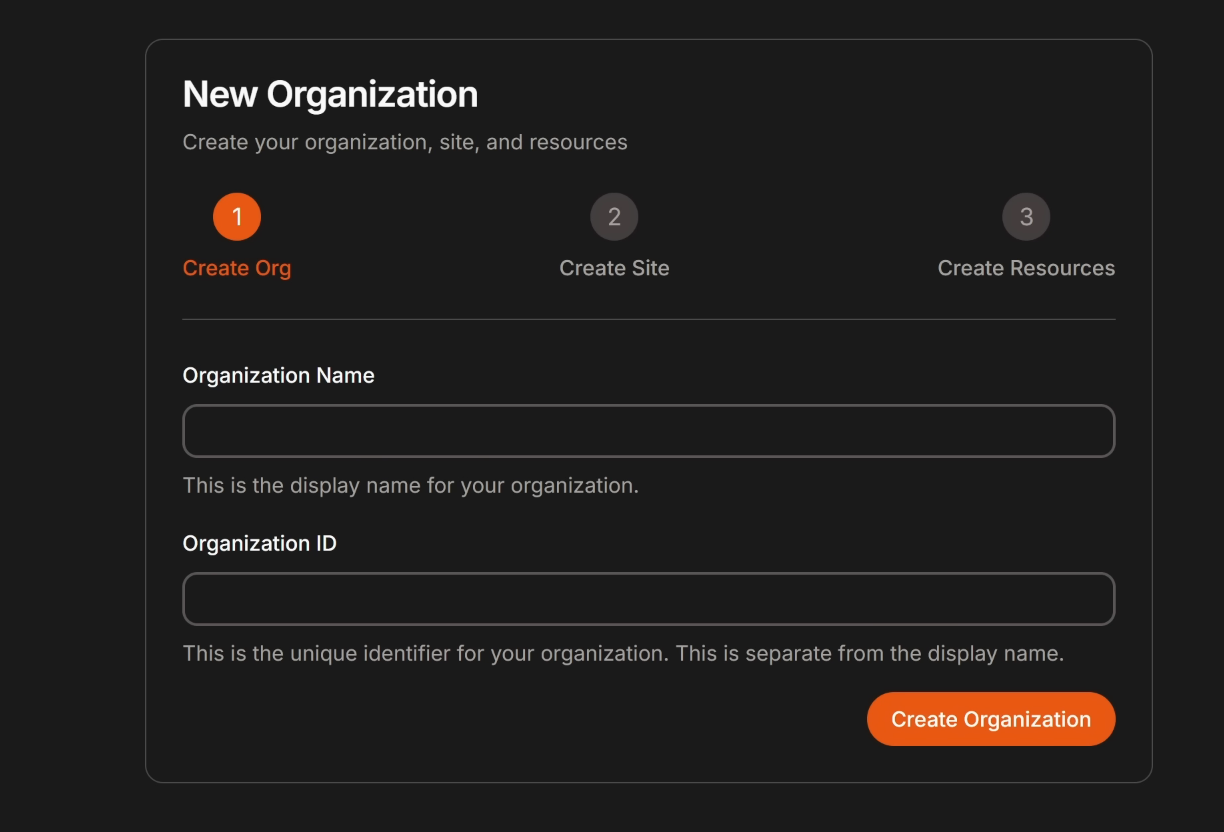
- Create your first organization after logging in:
a. Enter organization name and description
b. Click “Create Organization”
¶ Enable the Traefik dashboard for debuggin later.
- First we need to make sure the dashboard is enabled on the traefik config, it should be if your /opt/pangolin/config/traefik/traefik_config.yml is similar to mine.
api:
  dashboard: true
  insecure: true
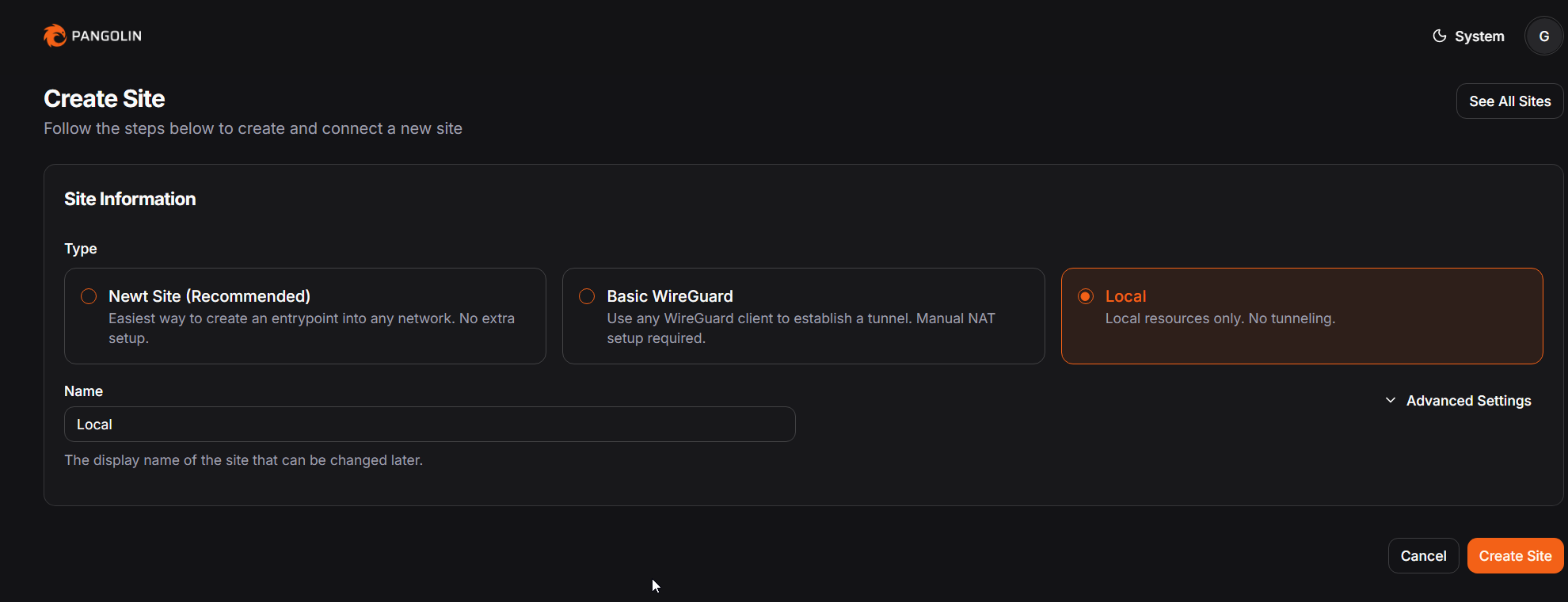
- Afterwards, we need to create a local site on the VPS.
a. Open the Pangolin UI
b. Navigate to Sites and create a Local Site
c. Assign it a name like "local"
Screenshot:
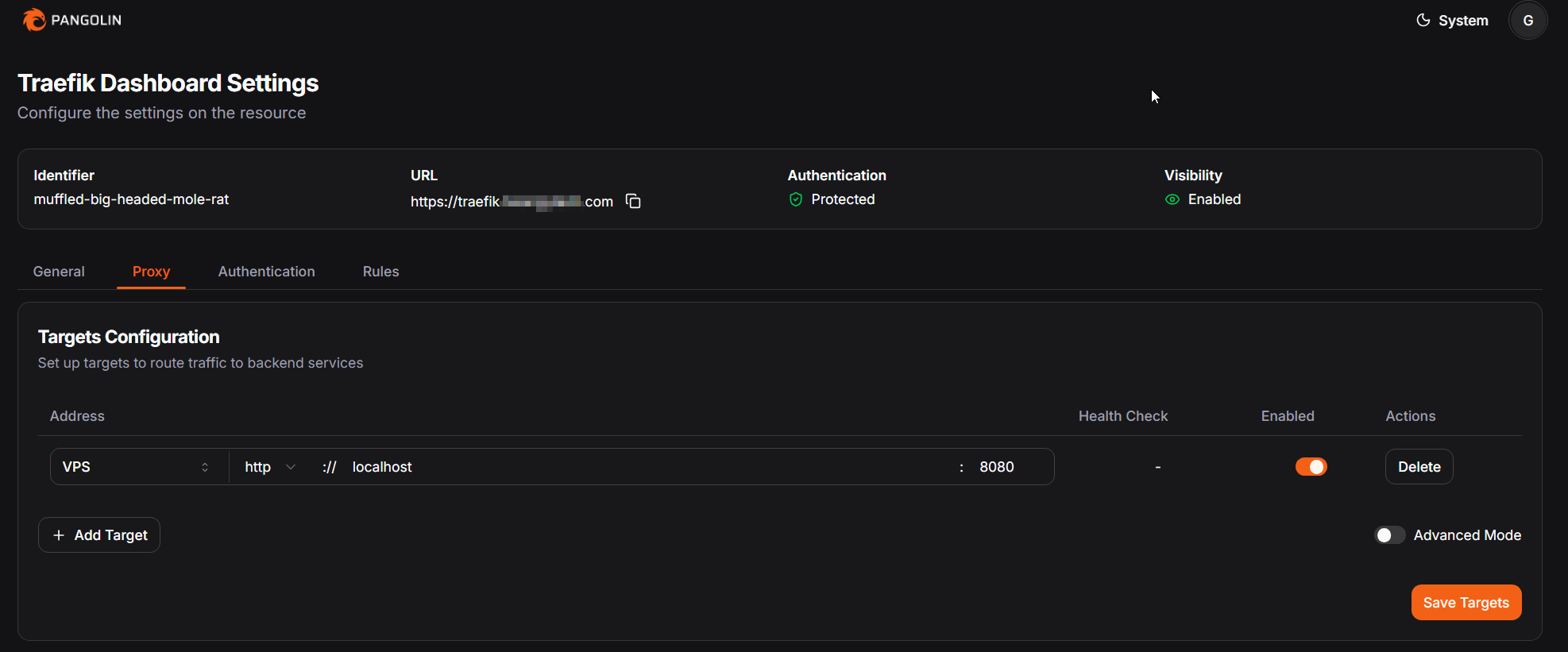
- Finally, create a resource for the Traefik dashboard.
a. Go to Resources in Pangolin
b. Click Create Resource
c. Fill in the following below
d. Under Authentication, assign a valid user/role to prevent unauthorized access
- Name: Traefik Dashboard
- Domain: traefik.example.com
- Site: Select your local site (e.g., local)
- Target: localhost:8080
Screenshot:
- Now you should be able to access your traefik dashboard (https://traefik.example.com)
¶ Installing and configuring Middleware Manager.
Next, we need to install Middleware Manager, that way we can configure and install middlewares on resources.
Currently, Traefik's Dynamic Config is listed inside of /config/traefik/dynamic_config.yml. We will be moving that to a new location!
- We will need to move that config file elsewhere. Here is the commands that we will need.
cd /opt/pangolin
sudo docker compose down
sudo mkdir -p ./config/traefik/rules
sudo mv ./config/traefik/dynamic_config.yml ./config/traefik/rules/
- Next, the directory structure should look like this.
Example structure of /opt/pangolin/config:
config/
├── config.yml
│   ├── config.yaml
├── db
│   └── db.sqlite
├── key
├── letsencrypt
│   └── acme.json
├── logs
└── traefik
    ├── logs
    ├── rules
    │   └── dynamic_config.yml
    └── traefik_config.yml
- Next, we need to update traefik_config.yml to include under
providers:
/opt/pangolin/config/traefik/traefik_config.yml
providers:
  http:
    endpoint: "http://pangolin:3001/api/v1/traefik-config"
    pollInterval: "5s"
  file:
    directory: "/rules"
    watch: true
- Update the compose file for traefik inside of docker-compose.yml.
/opt/pangolin/docker-compose.yml
    depends_on:
      pangolin:
        condition: service_healthy
    command:
      - --configFile=/etc/traefik/traefik_config.yml
    volumes:
      - ./config/traefik:/etc/traefik:ro # Volume to store the Traefik configuration
      - ./config/traefik/rules:/rules
      - ./config/letsencrypt:/letsencrypt # Volume to store the Let's Encrypt certificates
      - ./config/traefik/logs:/var/log/traefik # Volume to store Traefik logs
- After that, restart Pangolin
sudo docker compose down
sudo docker compose up -d --force-recreate
- Check logs to for Traefik
sudo docker logs traefik
- Add Middleware to the bottom of docker-compose.yml. Your compose file should look like this.
/opt/pangolin/docker-compose.yml
name: pangolin services: pangolin: image: docker.io/fosrl/pangolin:1.15.2 container_name: pangolin restart: unless-stopped volumes: - ./config:/app/config healthcheck: test: ["CMD", "curl", "-f", "http://localhost:3001/api/v1/"] interval: "10s" timeout: "10s" retries: 15gerbil:
image: docker.io/fosrl/gerbil:1.3.0
container_name: gerbil
restart: unless-stopped
depends_on:
pangolin:
condition: service_healthy
command:
- --reachableAt=http://gerbil:3004
- --generateAndSaveKeyTo=/var/config/key
- --remoteConfig=http://pangolin:3001/api/v1/
volumes:
- ./config/:/var/config
cap_add:
- NET_ADMIN
- SYS_MODULE
ports:
- 51820:51820/udp
- 21820:21820/udp
- 443:443
- 80:80traefik:
image: docker.io/traefik:v3.6
container_name: traefik
restart: unless-stopped
network_mode: service:gerbil # Ports appear on the gerbil service
environment:
CLOUDFLARE_DNS_API_TOKEN: "cloudflare-api-token"
depends_on:
pangolin:
condition: service_healthy
command:
- --configFile=/etc/traefik/traefik_config.yml
volumes:
- ./config/traefik:/etc/traefik:ro
- ./config/traefik/rules:/rules
- ./config/letsencrypt:/letsencrypt
- ./config/traefik/logs:/var/log/traefikmiddleware-manager:
image: hhftechnology/middleware-manager:v3.0.3
container_name: middleware-manager
restart: unless-stopped
volumes:
- ./data:/data
- ./config/traefik/rules:/conf
- ./config/middleware-manager:/app/config
- ./config/traefik:/etc/traefik:ro
environment:
PANGOLIN_API_URL: "http://pangolin:3001/api/v1"
TRAEFIK_CONF_DIR: "/conf"
DB_PATH: "/data/middleware.db"
PORT: "3456"
ACTIVE_DATA_SOURCE: "pangolin"
TRAEFIK_STATIC_CONFIG_PATH: "/etc/traefik/traefik_config.yml"
PLUGINS_JSON_URL: "https://raw.githubusercontent.com/hhftechnology/middleware-manager/traefik-int/plugin/plugins.json"
ports:
- "3456:3456"
depends_on:
- pangolin
- traefiknetworks:
default:
driver: bridge
name: pangolin
enable_ipv6: true
- Restart Pangolin again.
sudo docker compose down
sudo docker compose up -d --force-recreate
- Check Middleware-Manager logs
docker logs middleware-manager
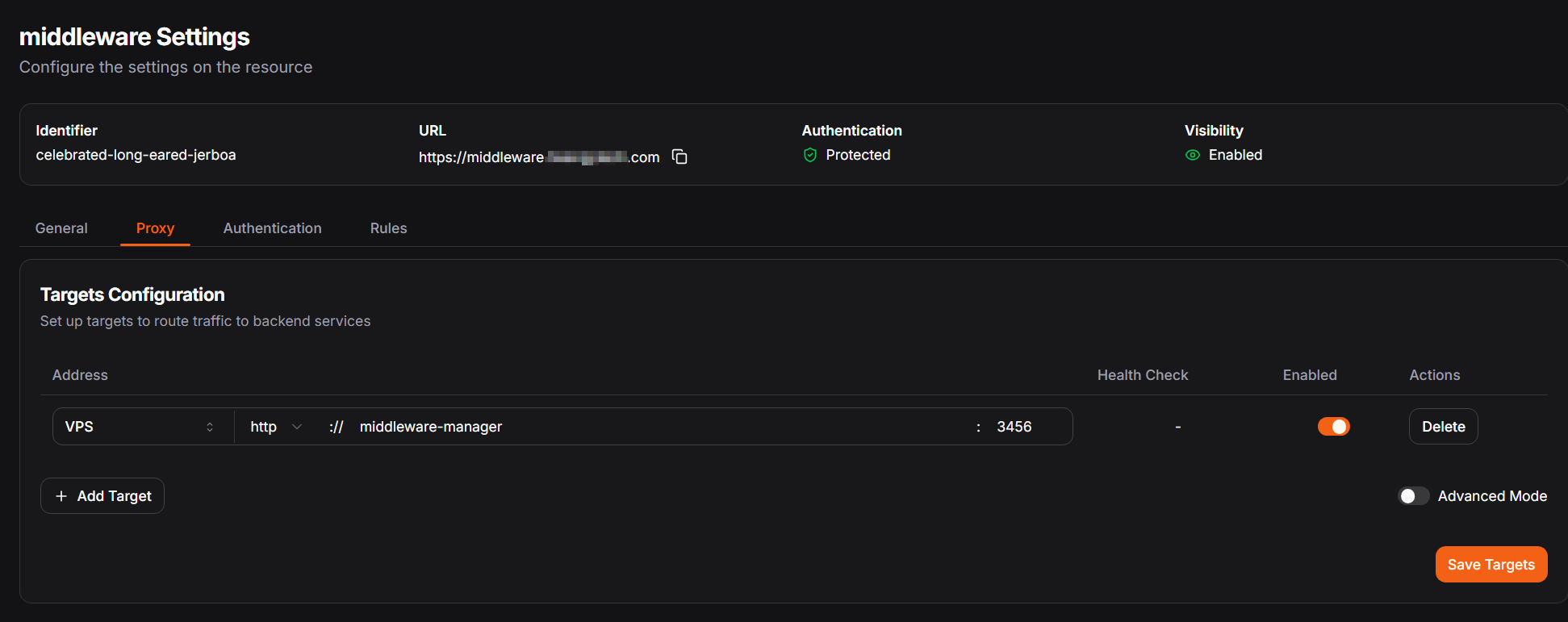
- Create a new resource inside Pangolin with the following:
Name: middleware
Domain: middleware.example.com
Site: Select your local site (e.g., local)
Target: middleware-manager:3456
Screenshot:
- Once again, restart Pangolin.
sudo docker compose down
sudo docker compose up -d --force-recreate
You can test everything
- Inside of Middleware Manager (middleware.example.com), select the Traefik Dashboard resource and apply the "ipwhitelist" middleware.
- Try accessing: https://traefik.yourdomain.com
- You should see a 403 Forbidden message. This is because your IP address is not specifically allowed
You can whitelist your IP like so:
- Add your IP to the middleware config:
Example whitelist
{
  "sourceRange": [
    "YOUR_IP_ADDRESS_HERE/32",
    "192.168.1.0/24",
    "10.0.0.0/8"
  ]
}
Now Middleware-Manager is setup, you can test around and add and protect resources as needed. Be careful and avoid locking yourself out of the main admin page
From this point forward, we will place dynamic rules in the /opt/pangolin/config/traefik/rules folder.
¶ Disabling HTTP Requests.
Check ufw rules before deletion to see what
port 80is allowed on: sudo ufw status numbered.
sudo ufw delete 7
sudo ufw delete 2
¶ Setting up fail2ban
If you followed along the VPS Setup guide, we setup SSH fail2ban rules. We can configure fail2ban to help secure Pangolin a bit tighter.
- Confirm logging is setup for Pangolin. We will check the /config/config.ymlto confirm logging is enabled.
/opt/pangolin/config/config.yml
gerbil: start_port: 51820 base_endpoint: "pangolin.example.com"app:
dashboard_url: "https://pangolin.example.com"
log_level: "info"
telemetry:
anonymous_usage: false
save_logs: true
log_failed_attempts: true
[...]
- Create fail2ban filters.
/etc/fail2ban/filter.d/pangolin-auth.conf
[INCLUDES]
before = common.conf

[Definition]

datepattern = ^%%Y-%%m-%%dT%%H:%%M:%%S.%%fZ
              ^%%Y-%%m-%%dT%%H:%%M:%%SZ
              ^%%Y-%%m-%%dT%%H:%%M:%%S%%z
              ^%%Y-%%m-%%dT%%H:%%M:%%S.%%f%%z

failregex = Username or password incorrect.+IP:\s*<HOST>
ignoreregex =
/etc/fail2ban/jail.d/pangolin-auth.conf
[pangolin-auth]
enabled  = true
backend  = polling
filter   = pangolin-auth
logpath  = /opt/pangolin/config/logs/pangolin-*.log
maxretry = 5
findtime = 5m
bantime  = 10m
action   = iptables[chain=DOCKER-USER,port=https,protocol=tcp]
- Update your /opt/pangolin/config/traefik/traefik_config.ymlfile, make sure to change your email back if you copy and paste.
/opt/pangolin/config/traefik/traefik_config.yml
api:
  insecure: true
  dashboard: true

providers:
  http:
    endpoint: "http://pangolin:3001/api/v1/traefik-config"
    pollInterval: "5s"
  file:
    directory: "/rules"
    watch: true

experimental:
  plugins:
    badger:
      moduleName: "github.com/fosrl/badger"
      version: "v1.3.1"

log:
  level: INFO
  format: json
  maxSize: 100
  maxBackups: 3
  maxAge: 3
  compress: true

accessLog:
  filePath: "/var/log/traefik/access.log"
  format: json
  filters:
    statusCodes:
      - "200-299"
      - "400-499"
      - "500-599"
  bufferingSize: 100
  fields:
    defaultMode: drop
    names:
      ClientAddr: keep
      RequestMethod: keep
      RequestHost: keep
      RequestPath: keep
      RequestProtocol: keep
      DownstreamStatus: keep
      Duration: keep
      ServiceName: keep
      StartUTC: keep

certificatesResolvers:
  letsencrypt:
    acme:
      dnsChallenge:
        provider: "cloudflare"
      email: "[email protected]"
      storage: "/letsencrypt/acme.json"
      caServer: "https://acme-v02.api.letsencrypt.org/directory"

entryPoints:
  web:
    address: ":80"
  websecure:
    address: ":443"
    transport:
      respondingTimeouts:
        readTimeout: "30m"
    http:
      tls:
        certResolver: "letsencrypt"
      encodedCharacters:
        allowEncodedSlash: true
        allowEncodedQuestionMark: true

serversTransport:
  insecureSkipVerify: true

ping:
  entryPoint: "web"
- Create more filters and jails.
/etc/fail2ban/filter.d/traefik-404.conf
[INCLUDES]
before = common.conf

[Definition]

# The regular expression looks for:
# - "ClientHost": "" – required group for IP (Fail2Ban uses )
# - "DownstreamStatus":404 – status 404
datepattern = %%Y-%%m-%%dT%%H:%%M:%%SZ

failregex = "ClientHost":"<HOST>".*"DownstreamStatus":\s*404
ignoreregex =
/etc/fail2ban/jail.d/traefik-404.conf
[traefik-404]
enabled  = true
backend = auto
filter   = traefik-404
logpath  = /opt/pangolin/config/traefik/logs/access.log
maxretry = 20
findtime = 5m
bantime  = 15m
action = iptables[chain=DOCKER-USER, port=https, protocol=tcp]
/etc/fail2ban/filter.d/traefik-429.conf
[INCLUDES]
before = common.conf

[Definition]

# The regular expression looks for:
# - "ClientHost": "" – required group for IP (Fail2Ban uses )
# - "DownstreamStatus":429 – status 429
datepattern = %%Y-%%m-%%dT%%H:%%M:%%SZ

failregex = "ClientHost":"<HOST>".*"DownstreamStatus":\s*429
ignoreregex =
/etc/fail2ban/jail.d/traefik-429.conf
[traefik-429]
enabled  = true
backend = auto
filter   = traefik-429
logpath  = /opt/pangolin/config/traefik/logs/access.log
maxretry = 5
findtime = 5m
bantime  = 15m
action = iptables[chain=DOCKER-USER, port=https, protocol=tcp]
/etc/fail2ban/filter.d/traefik-403.conf
[INCLUDES]
before = common.conf

[Definition]

# The regular expression looks for:
# - "ClientHost": "" – required group for IP (Fail2Ban uses )
# - "DownstreamStatus":403 – status 403
datepattern = %%Y-%%m-%%dT%%H:%%M:%%SZ

failregex = "ClientHost":"<HOST>".*"DownstreamStatus":\s*403
ignoreregex =
/etc/fail2ban/jail.d/traefik-403.conf
[traefik-403]
enabled  = true
backend = auto
filter   = traefik-403
logpath  = /opt/pangolin/config/traefik/logs/access.log
maxretry = 20
findtime = 5m
bantime  = 15m
action = iptables[chain=DOCKER-USER, port=https, protocol=tcp]
/etc/fail2ban/filter.d/traefik-sni.conf
[INCLUDES]
before = common.conf

[Definition]

# The regular expression looks for:
# - "ClientHost": "" – required group for IP (Fail2Ban uses)
# - "RequestAddr":"YOUR_VPS_IP
datepattern = %%Y-%%m-%%dT%%H:%%M:%%SZ

failregex = "ClientHost":"<HOST>".*"RequestAddr":"(?P<reqaddr>\d{1,3}(?:\.\d{1,3}){3})
ignoreregex =
/etc/fail2ban/jail.d/traefik-sni.conf
[traefik-sni]
enabled  = true
backend = auto
filter   = traefik-sni
logpath  = /opt/pangolin/config/traefik/logs/access.log
maxretry = 1
findtime = 5m
bantime  = 4h
action = iptables[chain=DOCKER-USER, port=https, protocol=tcp]
Make sure to update the file below (service1, example.com, etc...).
/etc/fail2ban/filter.d/traefik-service.conf
[INCLUDES]
before = common.conf

[Definition]

# The regular expression looks for:
# - "ClientHost": "" – required group for IP (Fail2Ban uses )
# "DownstreamStatus":404,[...],"RequestAddr":"notexistingdomain.example.com"
datepattern = %%Y-%%m-%%dT%%H:%%M:%%SZ

# Adapt example.com
failregex = "ClientHost":"<HOST>".*"DownstreamStatus":\s*404.*RequestAddr":".+\.example\.com

# Add the URLs to NOT trigger the ban on
ignoreregex = ^\{.*"RequestAddr":"(pangolin|service1|service2|service3)\.example\.com.*\}$
/etc/fail2ban/jail.d/traefik-service.conf
[traefik-service]
enabled  = true
backend = auto
filter   = traefik-service
logpath  = /opt/pangolin/config/traefik/logs/access.log
maxretry = 3
findtime = 10m
bantime  = 4h
action = iptables[chain=DOCKER-USER, port=https, protocol=tcp]
/etc/fail2ban/filter.d/traefik-40x-env.conf
[INCLUDES]
before = common.conf

[Definition]

# The regular expression looks for:
# - "ClientHost": "" – required group for IP (Fail2Ban uses )
datepattern = %%Y-%%m-%%dT%%H:%%M:%%SZ

failregex = "ClientHost":"<HOST>".*"DownstreamStatus":\s*40[34].*"RequestPath.+\.env
ignoreregex =
/etc/fail2ban/jail.d/traefik-40x-env.conf
[traefik-40x-env]
enabled  = true
backend = auto
filter   = traefik-40x-env
logpath  = /opt/pangolin/config/traefik/logs/access.log
maxretry = 3
findtime = 10m
bantime  = 4h
action = iptables[chain=DOCKER-USER, port=https, protocol=tcp]
- Restart Pangolin Stack
sudo docker compose down
sudo docker compose up -d
- Restart fail2ban
sudo fail2ban-client reload --all
If you have another public IP, or a VPN. You can confirm Fail2ban works properly by trying to log into your Pangolin website incorrectly. You can check that it is working properly by using sudo tail -f /var/log/fail2ban.log.

¶ Geo-blocking if you did not install earlier.
If you did not select Geo-blocking earlier on your installation, you can still enable Geo-blocking so you can setup some rules to block access.
- Navigate back to the /opt/pangolindirectory.
cd /opt/pangolin
- Download installer and extract GeoIP database
# Download the GeoLite2 Country database
sudo curl -L -o GeoLite2-Country.tar.gz https://github.com/GitSquared/node-geolite2-redist/raw/refs/heads/master/redist/GeoLite2-Country.tar.gz

# Extract the database
sudo tar -xzf GeoLite2-Country.tar.gz

# Move the .mmdb file to the config directory
sudo mv GeoLite2-Country_*/GeoLite2-Country.mmdb config/

# Clean up the downloaded files
sudo rm -rf GeoLite2-Country.tar.gz GeoLite2-Country_*
- Update the config/config.ymlfile to include below.
server:
  maxmind_db_path: "./config/GeoLite2-Country.mmdb"
- Restart pangolin.
cd /opt/pangolin
sudo docker compose down
sudo docker compose up -d
- Check logs to confirm everything is working correctly.
sudo docker logs pangolin
¶ What next?
With everything setup, you can setup Sites inside of Pangolin to connect devices to your VPS. With my setup, pangolin sits in between my servers at home so I can avoid port forwarding and exposing my home internet to everything and everyone.
- You can find more information here: Pangolin Stuff